


我的飲食小幫手

About
HealthBuy is a health diet management app where users can "scan" or "search" a food database to find the nutrients and ingredients of a food item to determine whether to eat it and how much to consume without exceeding daily intake, meeting health and weight loss needs.
Category
Health/Diet
Team
UI/UX Designer
Product Manger
Back-end Engineers
Android Engineers
iOS Engineers
Tools
Sketch
Marvel
Photoshop
Illustrator
After Effect
Jira
My Contribution
-
I was responsible for competitive product research, screen flow conceptualization, design execution, design system maintenance, animation design, marketing graphic design, etc., including design aspects for other company products.
-
When I joined the team, I was responsible for product optimization, new feature development, and product operations.
-
Working with the PM on optimization goals and new feature development, I participated in process and interface research, planned main page designs, and discussed feasibility with engineers.
-
Product daily operations required marketing graphic design and web message editing.
Goal

Create Manual Food Data
Develop a feature that allows users to manually add dietary data to help track daily food intake.

View Daily Nutritional Analysis
This feature allows users to view and compare daily meals, different items based on calories and seven key nutrients.

Add User Guide Introduction
Solve the guidance needs of new users. Each operational step is designed as a simple animation to help users get started more quickly.
Process


It provides ingredient and nutrition by scanning and recognition
User Research
User Profiles
This interview and questionnaire mainly aimed to understand users' "three meal eating habits," "dietary control experience," and "app usage overview."
From 60 questionnaires, female users accounted for 71% and male users 29%. Users were divided into three categories: new users, active users, and churned users. We hoped to discover optimization directions for the next stage after the product reached a certain development point.


Meal Eating Habits


About Dietary Control


App Usage Overview


Persona
Through interviews and questionnaires, we identified Persona classifications. After interviews, we divided personas into three categories:
-
Users who have developed their own dietary habits and have a positive attitude
-
Users who have developed their own dietary habits but have a casual attitude
-
Users who have not developed their own dietary habits and follow passively.
-
Among these, we explored dietary control habits based on:
-
Goal clarity level
-
Accumulation of relevant knowledge
-
Willpower level
-
Dietary control
-
Stability of routine
-
-
Since most users are still unclear about dietary control, we focused on the third persona prototype as the principle for the next development phase.


User Story


We organized the problems encountered in the past and interview content, categorizing them into five aspects. Each aspect contains several user scenarios that need exploration. We first engaged company colleagues in brainstorming sessions, exploring in groups, then categorizing information and reintegrating it.
Team Collaboration Method
Based on user analysis results, we identified five directions of difficulties users encounter:
-
Establishing personalized weight loss plans
-
Systematically learning nutritional knowledge
-
Wanting to eat/buy certain foods
-
Eating certain foods and confirming results
-
Regularly tracking goal progress
Each category has a user story description as an example. Using Zhiqing as our user prototype, we brainstormed various scenarios for each of these five areas, then integrated these ideas. This will be the basis for our next optimization.

Card Sorting Method
After brainstorming, I worked with the PM and nutritionist to create an affinity diagram using card sorting, organizing and categorizing team members' opinions.
After organizing, we assessed the current situation, listed items needing optimization, and prioritized them based on difficulty level for the next update. This produced the following optimization directions, and we reorganized the user journey map and site map.
User Journey Map

Site Map

Pain Points
For users with homemade dishes or foods not found in the database, they wish to have a customizable food data entry option to help record their daily diet.
Recording diet can increase awareness of food control, showing what was actually eaten and the effects of food. However, throughout the overall usage, users cannot feel the actual effectiveness and feedback from keeping records.
New users to our app are unclear about how to operate it. For this reason, we will create clear usage guidance to help users get started more quickly.
Optimization

Create Manual Food Entry
Pain Points
When users control their diet, they search for food content and record what they've eaten. However, when they can't find data, they cannot effectively keep records or see what items they've consumed.
Purpose
When users can't find the food/cooked meal data they want to record, they can manually create entries and complete their daily records.
Methods
In different usage scenarios, when users can't find the food they want to record while using "Search" or "Scan," they can link to the manual entry path from the homepage or Health Diary.

Add Custom Food Page
-
Design a blank manual input page
-
Provide default text for users to understand how to fill in the form
-
If the input value is not within range, a red reminder text will appear
Health Diary Page Optimization
-
Add a button to increase records
-
Clicking the button provides three methods to add records: scan, search, custom


Add "Custom Foods" to the Food List View
In the original view list:
-
Add a "Custom Foods" tab
-
Check any items you want to delete, and a trash bin will appear to execute deletion
流程設計

以掃描為例


View Daily Nutrition Analysis
Pain Points
Users cannot feel the actual effectiveness and feedback from keeping records.
Purpose
Allow users to quickly review and compare the calories and nutrients of each meal and each item throughout the day. This helps them discover which parts led to overconsumption or under-consumption, causing nutritional imbalance.
Methods
This new feature is designed within the Health Diary. It analyzes calories and nutrients for each meal and each item daily, presenting them in a list format with sorting, portion sizes, and percentages for user reference.


Add User Guide
Pain Points
New users are unclear about how to operate our app and lack clear guidance to help them get started quickly.
Purpose
Help new users quickly learn how to use the app. Six items with text descriptions introduce how to use each function. Simple animations make it easier to understand.
Methods
Six feature explanations are presented, each with animated icons and text descriptions. Simplified interface designs describe the operation process, allowing users to learn how to use our designed features in a short time.


1 Daily Calorie Goal
Enter your ideal diet plan, food allergens, and physical condition to easily understand your daily nutritional needs!

2 Food Scanning & Search
Scan packaged foods or search for cooked meals - quick and time-saving

3 Diet Traffic Light
Real-time intuitive traffic light indicators help you identify dietary information, showing you how the "food you consume" compares to your "daily recommended intake" percentage
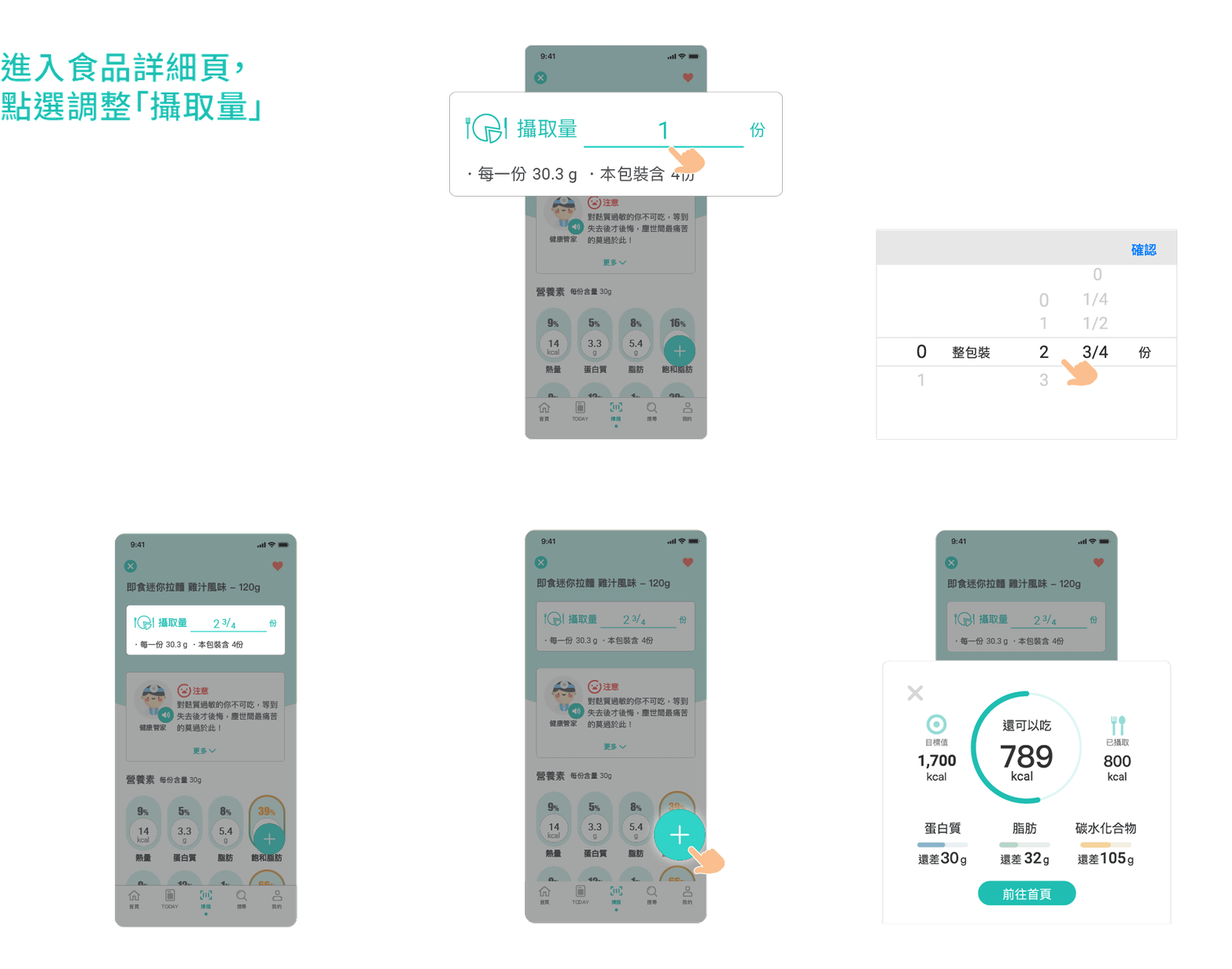
4 Add Diet Records
Through scanning/searching, find the food you want to record, select the intake amount, set your serving size and click "+"; complete your diet record in three easy steps
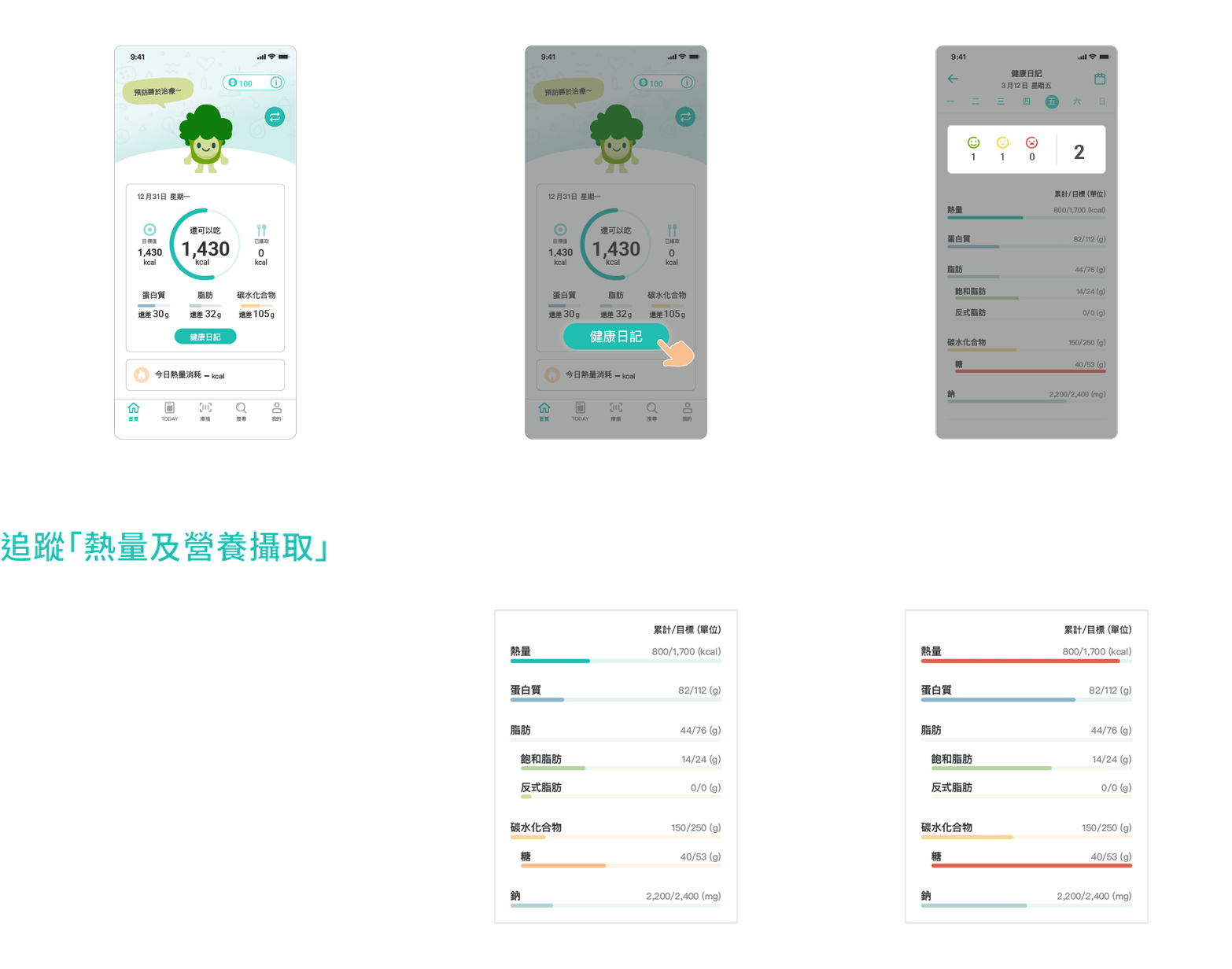
5 Review Health Diary
Review your health diary daily to understand your dietary preferences.
Track your nutritional intake goals, and help you adjust your eating habits!

6 Nutrition & Analysis
Which meal has the most calories, which foods should be consumed in moderation - "Daily Nutrition Analysis" decodes the secrets behind your dietary records!


Feedback
Current Product Status
Based on user research, we still have several future plans we want to implement, hoping to achieve "enhanced personalization," "add scientific knowledge," "plan systematic learning approaches," and more. We've also considered various new business model developments and experiments. Due to time constraints, it's difficult to see the complete follow-up development.
We've also made the following optimizations to make the product's functionality more complete and the experience smoother:
-
Food unit adjustments
-
Account deletion request process
-
Portion adjuster upper and lower limit unit adjustments
-
Algorithm optimization for search result sorting
Learning Experience
-
Understanding that the entire product operation and cross-departmental collaboration requires comprehensive communication and thinking, using efficient methods to solve problems.
-
Compared to before, I can better sense how, as a designer, to help the team propose appropriate methods for experience and brand image, offering perspectives from my professional standpoint.
-
Clear division of work and cooperation is needed to achieve mutually agreed-upon goals within deadlines.
-
Though our team isn't large, this collaboration had clearer plans and guidelines, which I believe are essential for project success.